

I lost about forty minutes of unsaved invoice work in January when a wind gust took out power to my block for maybe four seconds. Four seconds. That's all it took to hard-crash my desktop and reset my router, and by the time everything rebooted and I found my place again, I'd burned most of a lunch break. That same week I ordered the APC BE600M1, a small 600VA battery backup, and it's been sitting on the floor next to my desk ever since.
I run a home office out of a converted spare bedroom. Desktop tower, two monitors, a mesh router node, and a cable modem, all things that hate losing power mid-task even more than I do. Six months in, I've been through three real outages, a dozen or so blinks and brownouts, and one afternoon where a neighbor's tree service tripped something on the pole outside. This is what actually happened, not what the box promised.
The Quick Verdict
A genuinely useful piece of gear for anyone who works from home on a desktop or a router that can't just sleep through a blink. Not flashy, does exactly one job, does it well.
Amazon Check Today's Price →Stop losing work to four-second power blinks
The APC BE600M1 is the exact model I've had running under my desk since January. Check today's price and current stock on Amazon.
Amazon Check Today's Price on Amazon →How I've Used It
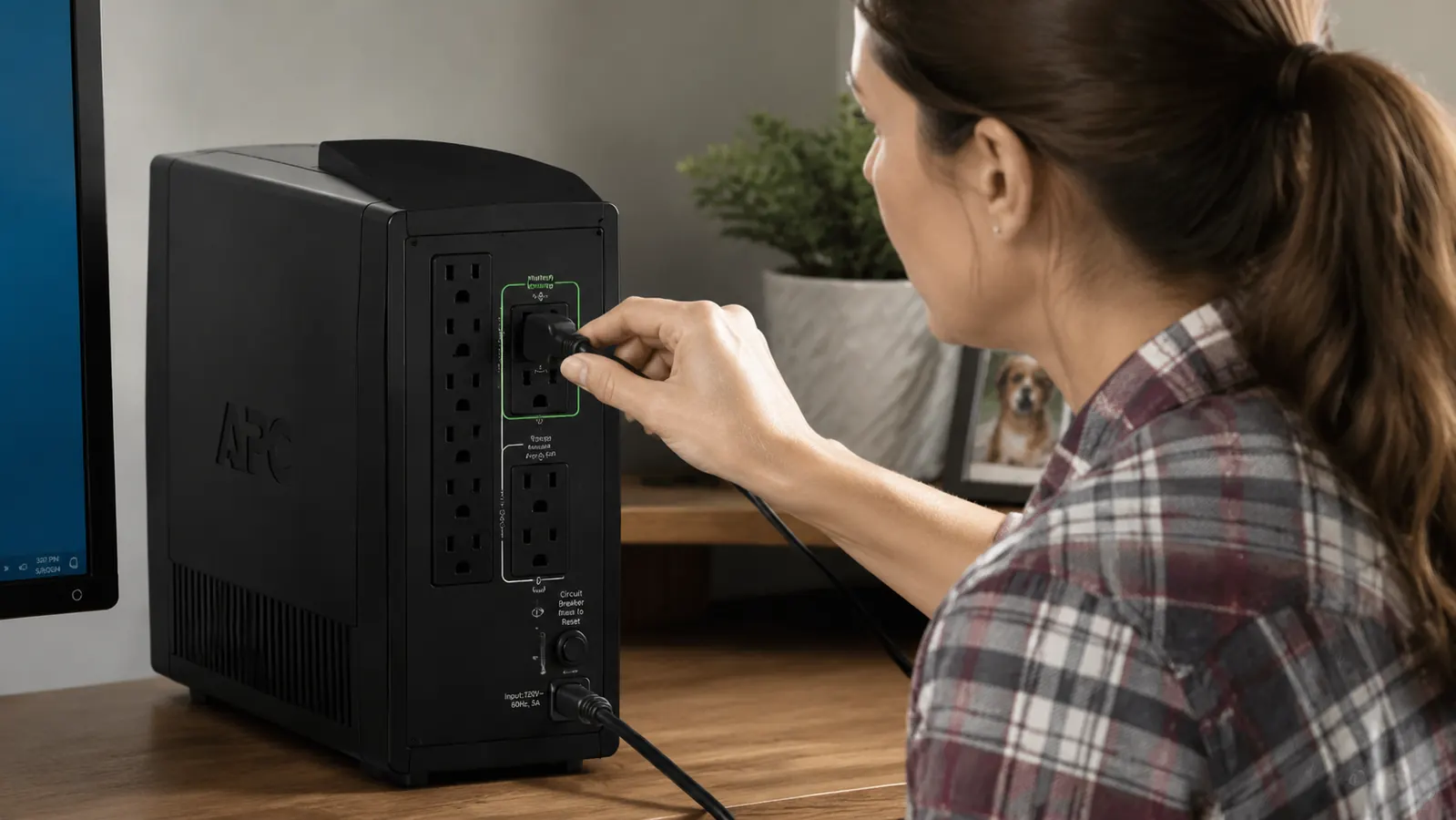
Setup took about ten minutes, most of which was moving furniture to get to the outlet behind my desk. The unit itself is about the size of a large shoebox standing on end, black plastic, with a carrying handle molded into the top. I plugged my desktop tower and my router into the battery-backed outlets (there are 5 on the BE600M1, though only some are battery-backed, the rest are surge-only), and left my monitors and desk lamp on the surge-protected side since they don't need to survive an outage, they just need to not get fried by a spike.
I labeled every plug with a strip of painter's tape and a Sharpie the first weekend, mostly because I knew future me would forget which outlets were which. That turned out to be smart, because six months later I still glance at the tape before plugging in anything new. If you're setting one of these up, do the same. It takes two minutes and saves you from accidentally putting a space heater or a printer on the battery side, which will drain the runtime you're counting on for the stuff that actually matters.
The unit has a small LED indicator strip and an alarm speaker built in. When the power cuts, it switches over fast enough that my monitors don't even flicker, my desktop just keeps running like nothing happened. The alarm chirps every few seconds while it's on battery, which is annoying but also exactly the point. You want to know the power is out even if you're in another room.
I've had three actual outages since January. The longest was about eleven minutes during a March storm. The unit gave my setup enough runtime to save my work, close everything cleanly, and shut the desktop down before the battery got anywhere near empty. The other two were shorter, four and seven minutes, and I barely noticed either one happen except for the chirping. There was also a fourth event that doesn't show up on the utility company's outage map at all, a brownout in June where the lights dimmed for maybe two seconds but never fully cut out. The UPS caught that too and switched to battery briefly before switching back, which told me it's watching more than just full blackouts.
Real Runtime Numbers
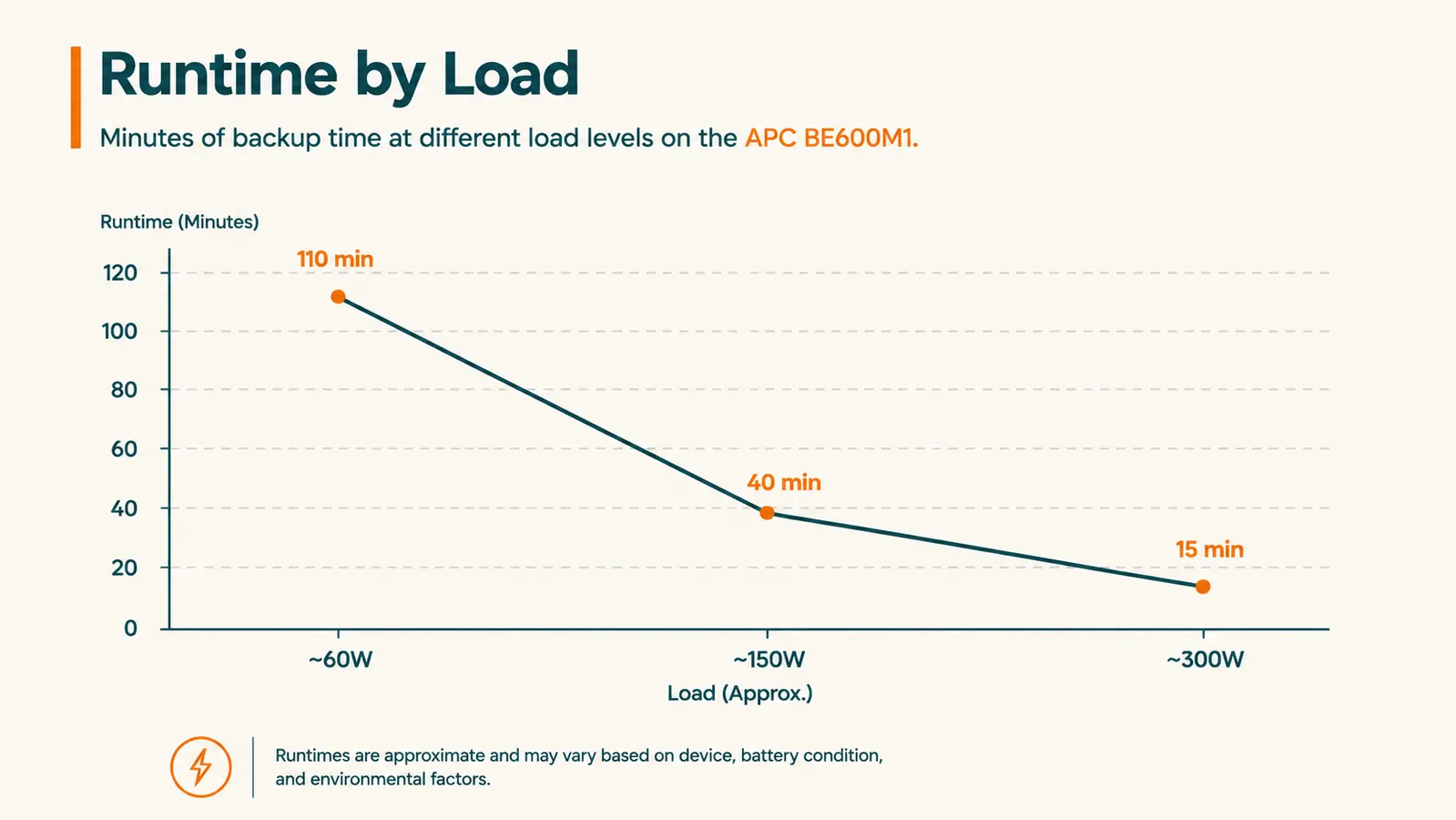
APC rates this thing for 600VA and 330 watts, and the marketing chart on the box shows runtime numbers that are technically accurate but optimistic for real desk setups. I tested it myself with a kill-a-watt meter on three different loads to see what I'd actually get, since I've learned the hard way that manufacturer runtime charts assume ideal conditions and a battery that's brand new, not one that's been sitting through a few dozen charge cycles.
With just the router and modem running, pulling around 15 to 20 watts combined, I got just over two hours of runtime before the low-battery warning kicked in. That's plenty of time to ride out anything short of a multi-hour outage, and honestly more than I need since I don't have a generator to bridge to anyway.
With my full desktop tower running (no monitors, those were on a separate strip) pulling around 90 to 110 watts under normal desk use, I got roughly 12 to 15 minutes before shutdown warnings started. That's enough to save your work and close programs, not enough to keep working through a real outage. If you add a monitor to the battery side, you're looking at 6 to 8 minutes, which is genuinely tight.
The takeaway from six months of watching that little runtime countdown: this unit is built for graceful shutdown and bridging short blips, not for working through a long outage. If you need to keep working for an hour during a real blackout, you need a bigger UPS, probably a 1000VA or larger unit with more battery capacity. This one is sized right for a router, a modem, and giving your desktop enough breathing room to save and shut down.
The Beeping, Because Everyone Asks
Every review I read before buying mentioned the alarm, so I want to be straight about it. When the power cuts, it beeps every few seconds. It's not subtle and it's not meant to be. My wife has come into my office more than once assuming I'd knocked something over. Once the battery gets low, the beeping changes to a faster pattern, which is genuinely useful because it tells you, without looking at anything, that you're out of time and need to save now.
There's also a low, almost inaudible hum from the internal fan and transformer during normal operation. I only notice it if the room is dead silent, which in my house with a dog that has opinions about the mail carrier, is rare. It has never bothered me during calls or recordings.
Build Quality After Six Months
The plastic housing feels like what it is, a budget-friendly injection molded case, not a tank. It hasn't cracked, warped, or discolored sitting on my office floor where it occasionally gets bumped by a rolling chair or a curious 60 pound dog. The outlets have held their grip on plugs fine, no looseness after repeated plug-swaps while I was testing different loads.
The one thing I'll flag is weight. It's a dense little brick, mostly because of the internal lead-acid battery, and if you're mounting anything or running it on a shelf rather than the floor, make sure whatever it's sitting on can hold roughly 12 pounds without flexing.
I also popped the front panel off once, about three months in, mostly out of curiosity about what was ticking during the self-test cycle it runs automatically every couple of weeks. Nothing dramatic in there, just the expected sealed lead-acid battery and a circuit board, but the self-test itself is worth knowing about. Every couple weeks the unit runs a brief internal check, and during that check you'll hear a single beep and see the light pattern change for a second or two. The first time it happened I thought the power had blinked, checked my phone, and realized nothing was wrong, it was just the unit checking its own battery health. Once you know that's normal, it stops being confusing.
Alternatives I Considered
Before landing on this one, I looked at a couple of other options. A cheaper no-name 400VA unit from a marketplace brand was about 15 dollars less, but the reviews were full of people reporting dead batteries within a year, and I didn't want to be replacing a UPS every twelve months just to save a few bucks up front. I also considered stepping up to a larger 1000VA APC model, which would have given me real working time during longer outages, but it costs more, takes up more floor space, and for my setup, a router, a modem, and a desktop, the extra runtime wasn't worth the extra footprint under my desk.
I landed on the BE600M1 because it hit the sweet spot for what I actually needed, protection for the things that can't just reboot and lose their place, not a full home power backup system. If your setup includes a NAS drive, a second monitor you need lit during an outage, or anything else that draws more continuous power, you might want to size up. For a single desktop and networking gear, this has been the right call.

What It Doesn't Do
This isn't a pure sine wave inverter, it's a stepped approximation, which is fine for computers, routers, and most electronics but can cause some sensitive audio gear or certain laser printers to behave oddly on battery power. I don't run either of those off mine, so it hasn't been an issue for me, but it's worth knowing before you plug in something finicky.
It also doesn't have a USB-C data port or app-based monitoring, just a basic USB-A connection for the optional PowerChute software if you want automated shutdown scripting on a Windows or Mac machine. I set that up once and haven't touched it since. It works, it's just not a modern app experience.
What I Liked
- Switches over fast enough that monitors never flicker during a cutout
- Real-world runtime matches what you'd need for graceful shutdown, not false advertising on the box
- Alarm is genuinely useful for knowing power is out from another room
- Held up fine to six months of floor placement and the occasional dog collision
- Battery-backed and surge-only outlets are clearly separated so you can plan your setup
Where It Falls Short
- Alarm beeping is loud and can't be muted without a workaround
- Runtime under a full desktop load is short, 12 to 15 minutes, not built for long outages
- Stepped approximation waveform isn't ideal for sensitive audio or some laser printers
- Battery will need replacement in 3 to 5 years, which is an added cost down the line
- No modern app, just basic USB monitoring software
It's not going to run my whole office through a two hour blackout. It's going to give me the twelve minutes I actually need to not lose anything.
Who This Is For
If you work from a home office where a dropped connection or an unsaved file actually costs you money or time, this is a cheap insurance policy. Anyone running a desktop tower instead of a laptop is the clearest case, laptops have their own battery, but desktops die instantly the second the wall power drops. Same goes for anyone whose internet setup (router, modem, mesh node) needs to stay up so client calls don't drop mid-sentence.
It's also worth it if you live somewhere with frequent short outages or brownouts, which for me is basically every storm season. You don't need a whole-house generator to solve the four-second blink problem, you need something exactly like this sitting quietly under your desk.
I'd also point this at anyone running a side business out of their house, invoicing software, client files, a point of sale system, anything where a hard crash mid-save could mean redoing real work, not just re-opening a browser tab. My brother-in-law runs a small bookkeeping practice from his converted garage, and after hearing about my January outage he picked one of these up too. Six weeks in he had his own four-minute blink during a windstorm and texted me a screenshot of the unit's status light instead of a panicked call about lost client data. That's the entire value proposition in one text message.
Who Should Skip It
If you work entirely on a laptop with its own battery and don't rely on a router staying powered, you probably don't need this specific unit, your laptop already handles the blink problem on its own. And if you're trying to work through hours-long outages regularly, this isn't sized for that job, you'll want to look at a larger capacity UPS or a proper backup power setup instead of expecting this smaller unit to stretch further than its battery allows.
A four-second blink shouldn't cost you an afternoon of work
This is the exact APC BE600M1 I've had wired into my desk setup for six months now. See today's price on Amazon before your next storm season starts.
Amazon Check Today's Price on Amazon →