
If you work out of a converted garage, a spare bedroom without its own vent, or basically any room that isn't on the same duct run as the rest of the house, you already know the problem. By 2pm the air goes still, the laptop fan starts working overtime, and you're checking the thermostat every twenty minutes wondering if it's worth the electric bill to knock it down three degrees. I've worked from a garage office in central Texas for going on four years now, and I learned the hard way that cranking the AC isn't actually the fix. Air movement is. A nine dollar USB desk fan solved more of my heat problem than two summers of fighting with the thermostat ever did.
This isn't a product pitch dressed up as advice. It's the actual routine I use, including the placement mistakes I made first and the habits that stuck. If your desk turns into a sauna every afternoon, the fix is cheaper and simpler than most people assume, and it doesn't involve an electrician or a new HVAC run.
Skip the thermostat war and fix the air right at your desk
The JZCreater USB desk fan runs off any USB port, has three real speeds, and rotates to aim exactly where you need it. It's the cheapest fix I've found for a hot home office, and it's the one I still use every day.
Amazon Check Today's Price on Amazon →Step 1: Figure out why your desk is actually hot
Before you buy anything, spend a day paying attention to where the heat is coming from. In my garage office it was three things stacked on top of each other: afternoon sun hitting the west wall, a desktop tower blowing its own exhaust heat back at my legs, and a door that stays shut most of the day because the dog likes to nap in the doorway. None of those get fixed by lowering the thermostat two degrees. A fan aimed at your body doesn't cool the room, it cools you, and that's actually what you need most of the time. Moving air across skin evaporates sweat and makes 78 degrees feel like 72, which is the whole trick.
If your room has a specific heat source, like a tower PC, a window with no blinds, or a laser printer that runs hot, note where it sits relative to your chair. That tells you where the fan needs to point in Step 3, not just that you need a fan in general.
I also learned to check my own habits. I used to keep my garage door cracked two inches for ventilation, which felt smart but was actually pulling in hot exterior air all afternoon instead of cooling anything. Closing it up and relying on a fan for air movement worked better than the crack ever did. Little assumptions like that one add up, and most people never test them because they seem obviously true until you actually check a thermometer against the wall.
Step 2: Pick a fan that's actually built for a desk, not a nightstand
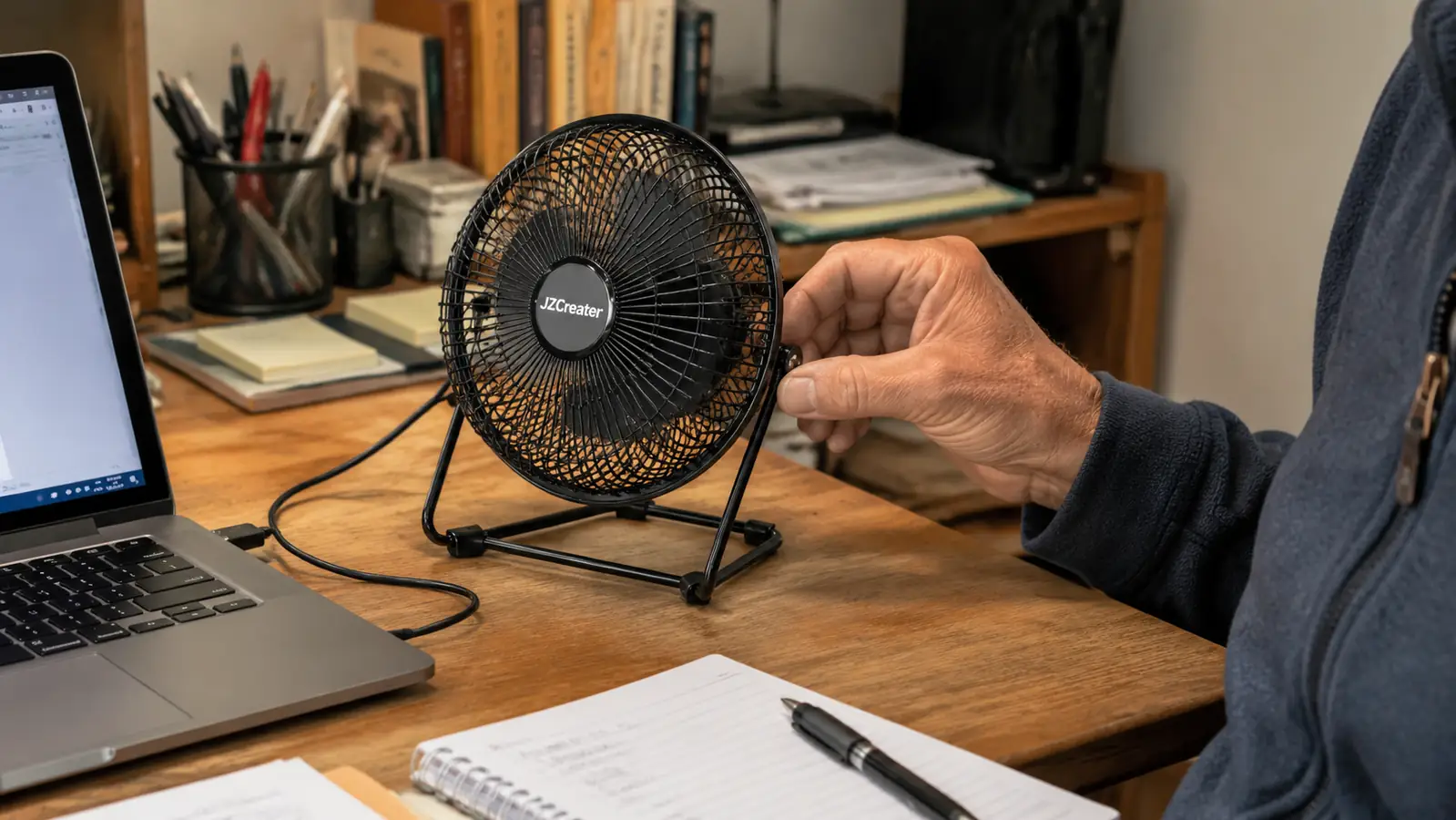
A lot of the fans sold as desk fans are really just small bedroom fans with a shorter cord. That matters because desk fans need to survive a different environment. Yours is going to sit two feet from your keyboard, get bumped by your elbow, get its cord run across a cluttered desk, and probably get knocked over at least once. I've had cheap ones with plastic bases so light they'd tip over from their own vibration on speed three.
The JZCreater is the one I settled on after going through two other options that didn't hold up. It's got a weighted base that doesn't walk itself across the desk, three actual speed settings instead of the usual two, and it plugs straight into any USB port or USB power brick, so it doesn't tie up an outlet if your power strip is already maxed out. It's a small thing but it matters when your desk already has a monitor, a UPS, a lamp, and a laptop charger all fighting for the same power strip.
Whatever you pick, look for a tilting or rotating head. A fixed fan that only blows straight ahead means you're stuck sitting exactly where it's aimed, which gets old fast when you shift positions to stretch your back or lean over to grab a cable.
Size matters more than people think too. Anything much bigger than the palm of your hand starts eating desk real estate you don't have, especially if you're already running a laptop stand, a headset stand, and a drawer organizer in the same footprint. Small and quiet beats big and loud for anyone who spends real hours at the desk instead of just checking email twice a day.
Step 3: Place it where it does the most good
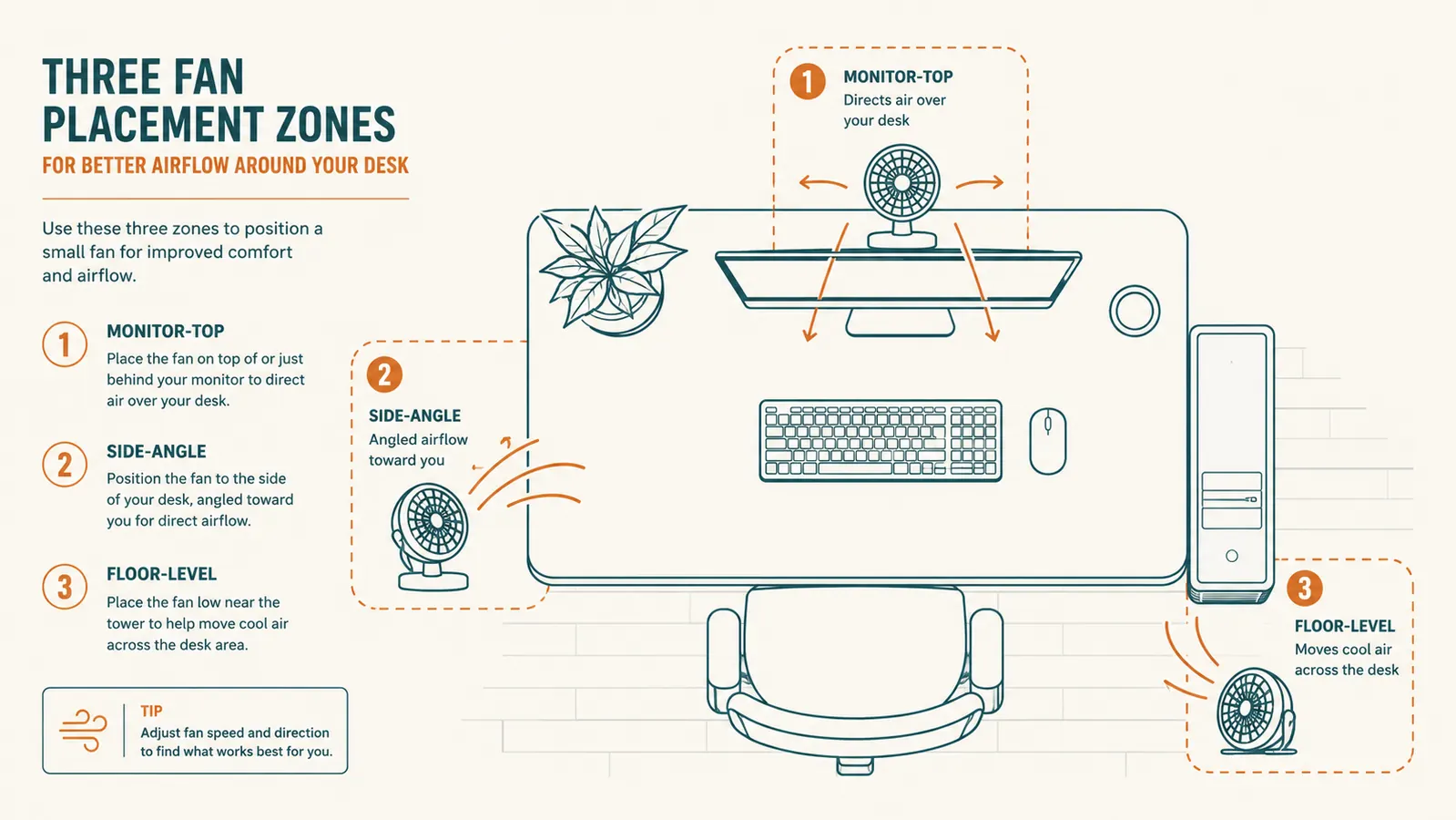
This is the step most people skip, and it's the one that actually determines whether the fan helps or just moves warm air around uselessly. I run mine at the left corner of my desk, angled across my chest and face rather than straight at my monitor. Aiming a fan directly at your screen does nothing for you and just kicks dust onto the glass. Aim it at your body, specifically your upper body and face, since that's where you actually feel temperature.
If you run a desktop tower under your desk, consider a second placement lower down, angled at your legs and the tower's exhaust vent. Heat pools near the floor around a running tower more than people expect, and your legs will thank you on a hundred-degree day. I keep my main fan at chest height and let a second small fan handle the floor zone when it's really bad outside.
Avoid boxing the fan in behind your monitor stand or a stack of books. It needs open air both in front and behind the intake to actually move volume, not just spin. I made that mistake for a solid month, tucking mine behind a monitor riser to save space, and couldn't figure out why it felt weaker than it used to. Pulling it two inches forward into open air fixed it completely.

Step 4: Match the speed setting to the time of day, not just to how hot you feel
Running a fan on high all day sounds like the obvious move, but it's actually the wrong call more often than not. High speed on a small fan creates a narrow, forceful stream of air that dries out your eyes fast if you wear contacts, and it's loud enough to bleed into a video call mic if you're not on a headset. I run mine on low in the morning when the room hasn't heated up yet, bump to medium by early afternoon, and only go to high for the worst hour or two, usually 2pm to 4pm in my setup.
Medium is where I live most days. It's quiet enough that a client on a call has never once asked what that noise is, and it moves enough air that I stop noticing the heat instead of fighting it. If you're on calls all day, test your fan's noise level with your headset mic before you commit to a speed, since some cheaper fans get a rattly hum on their top setting that low-end microphones pick up more than you'd expect.
One habit that helped more than I expected: I switch the fan off during actual video calls and back on the second the call ends. Thirty seconds of inconvenience beats a client wondering what that hum in the background is. It's such a small habit that it took maybe a week to become automatic, and now I barely think about it, same as muting the mic before I sneeze.
Step 5: Combine it with a couple of cheap habits that multiply the effect
The fan alone gets you most of the way there, but a few small changes stack on top of it. Closing blinds or hanging a cheap blackout curtain on any window that catches direct afternoon sun cuts down on how much heat builds up in the first place, which means the fan has less work to do. I also keep a glass of ice water on the desk, and yes, that's partly about hydration, but the cold glass itself does a little bit of passive cooling to the desk surface right next to my arm.
If your room allows it, cracking a door to a cooler part of the house for even fifteen minutes mid-afternoon while the fan runs creates a weak but real cross breeze. It's not air conditioning, but paired with a fan aimed at your body it closes the gap noticeably. None of these habits cost anything, and none of them require touching the thermostat.
I'll also say this plainly, since I get asked it a lot: none of this replaces a room that's genuinely too hot to work in, like a garage hitting 95 degrees with no insulation. A fan moves air, it doesn't lower actual room temperature. If you're regularly above 85 in the room itself, you need an actual cooling source, whether that's a window unit, a mini split, or better insulation. The fan is for taking a workable-but-uncomfortable room and making it comfortable, not for making an unlivable room livable.
What Else Helps
A fan handles the moving-air half of the equation, but if your office runs hot every summer, a couple of other cheap fixes are worth pairing with it. A reflective window film or even a piece of foam board propped in a west-facing window during peak sun hours blocks a surprising amount of radiant heat before it ever reaches your desk. If you're running a desktop tower, blowing the dust out of its intake fans every few months keeps it from adding its own heat load to the room, since a dust-choked tower runs hotter and pushes more warm exhaust air out than a clean one. And if your chair has any kind of fabric or mesh back, a small breathable seat cushion can matter more than people expect, since a sweaty lower back is often the first place people notice they're overheating, before they even register the room itself is warm. One more cheap habit worth mentioning: a small clip-on thermometer near the desk takes the guesswork out of all of this. Once you know your room actually sits at 82 instead of the 90 it feels like, you stop overcompensating with the fan on full blast all day and start using the setting that actually matches the moment.
Air movement cooled me down faster than the thermostat ever did, and it did it for the price of a coffee run.
Stop sweating through your afternoon shift
I've run the JZCreater fan on my desk for months through a Texas summer in a garage office with no dedicated AC vent. Three speeds, a rotating head, and it plugs into anything with a USB port. It's the cheapest real fix I've found for a hot desk.
Amazon Check Today's Price on Amazon →