

I bought the Logitech H390 back in January because my laptop's built-in mic made me sound like I was calling in from inside a coffee can. Six months and roughly four hundred hours of call time later, it's still the headset sitting on my desk every single workday. That's the only review that matters to me anymore, not the unboxing, not the first impression, but whether a piece of gear is still earning its spot after half a year of real use.
I work out of a converted garage office in Ohio, three client calls a day on average, plus a weekly two-hour team training session that used to leave my ears aching by the end. I've run the H390 through all of it: cold mornings with the space heater humming, summer afternoons with a box fan going, and enough Zoom calls that my dog Winston has learned to go quiet the second he hears the ringtone.
The Quick Verdict
A reliable, no-fuss wired headset that fixes the number one complaint on remote work calls, muffled audio, for less than the cost of a dinner out.
Amazon Check Today's Price →Tired of "Sorry, can you repeat that?" on every call?
The H390 plugs in, gets recognized instantly, and just works. No pairing, no dropouts, no dead batteries mid-meeting.
Amazon Check Today's Price on Amazon →How I've Used It
My setup is simple: a Dell laptop docked to a single monitor, the H390 plugged straight into a USB-A port, no dongle, no software to install. I use it for video calls with clients, for internal standups, for the occasional podcast-style interview I record for a side project, and for phone calls I route through my computer instead of my cell. That covers a pretty wide range of what a headset actually gets asked to do in a home office.
I didn't baby it either. It's been tossed in a laptop bag for two work trips, left on the desk under a stack of mail more than once, and the cable has been run over by my office chair wheels probably a dozen times. I wanted to see what actually breaks down under normal, slightly careless daily use, not the pristine lab conditions most reviews pretend everyone lives in.
The short version: nothing has broken. The cable shows a little wear near the strain relief where it meets the controller, but it still works fine. The headband hasn't loosened or squeaked. The ear cushions have flattened slightly but haven't split or peeled, which is more than I can say for a cheaper headset I went through the year before this one. That one started shedding foam from the ear pads by month three, little black flecks all over my shoulders, which is a small thing until you notice it happening every single day.
Mic Quality on Real Calls
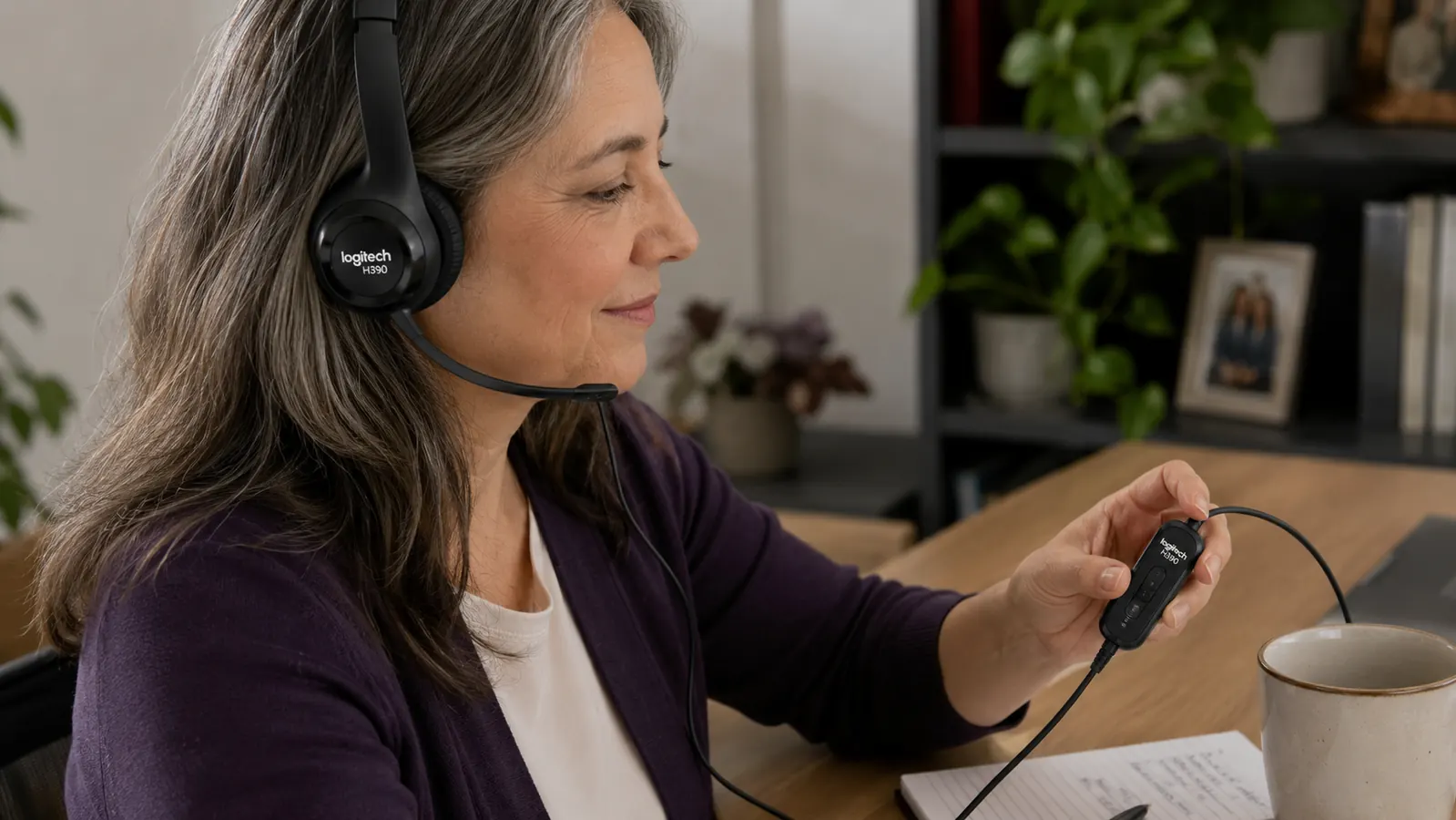
This is the reason I bought it, so it's the first thing worth talking about. The noise-cancelling boom mic does what Logitech says it does. On a call with the box fan running four feet away, three separate coworkers told me they couldn't hear any background noise at all. Compare that to my laptop mic, which picked up the fan, Winston's collar jingling, and at one point apparently a passing truck.
The mic isn't studio quality. If you're recording a podcast for public release, you'll still want a dedicated USB mic on a boom arm. But for the actual use case, which is being clearly understood on a work call, it's more than enough. I've done client calls where the client specifically mentioned how clear I sounded, which never happened once in the two years I used a laptop mic.
One thing worth mentioning: the mic needs to sit close to your mouth to get the full noise-cancelling benefit. I flip it up when I'm not talking out of habit, and the first week I had it positioned too far from my mouth and got one comment about sounding distant. Once I adjusted it down closer, that went away completely. It took me about three calls to find the right position and now it's muscle memory, I don't even think about it anymore.
I also tested it against a coworker's Bluetooth earbuds during a joint client call, same room, same background noise. The client on the other end told us afterward that my audio was noticeably clearer and hers had a faint static hiss under her voice the whole time. That's obviously one data point and not a lab test, but it matched what I expected going in. Wired connections just tend to have fewer variables that can go wrong mid-call.
Comfort Over Long Days
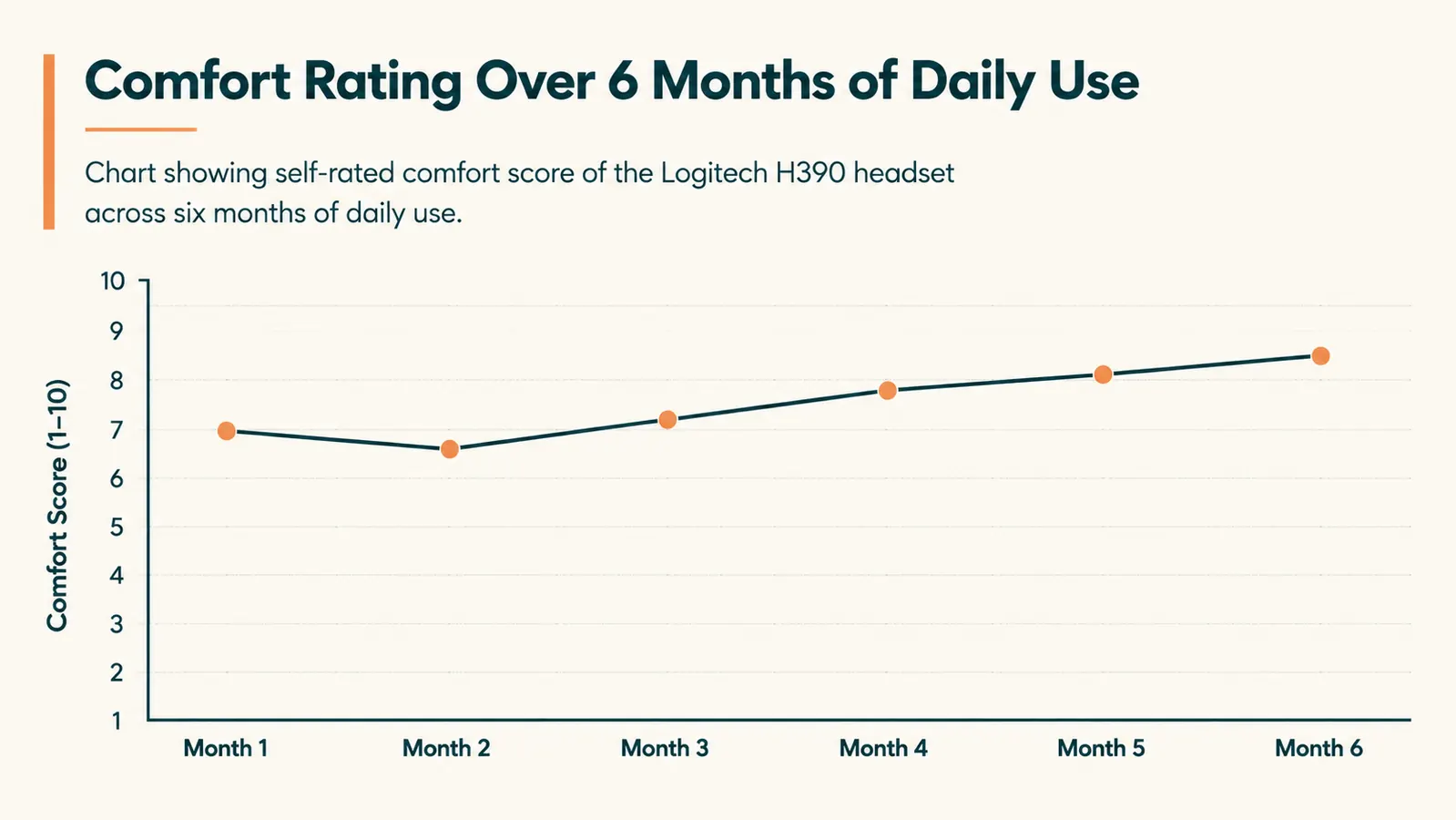
I have a training session every Thursday that runs close to two hours, and that's the real test for any headset. Cheap headsets start pinching my ears around the ninety-minute mark. The H390's padded headband and cushioned ear pieces got me through the full session without that clamping feeling, at least for the first four months.
By month five, I did notice the cushions had compressed enough that longer sessions started to feel a little warmer against my ears than when it was new. It's not painful, just a mild warmth after ninety minutes or so. It's the kind of thing you'd only notice if you're wearing it as much as I am. For someone doing two or three calls a day instead of stacking hours back to back, I don't think this would ever become an issue.
The headset is light, which helps. I've worn heavier gaming-style headsets for work calls before and they left a dent in my hair by 3pm. The H390 doesn't do that. I can take it off after a call and go straight into an in-person meeting without looking like I just took off a bike helmet.
The headband adjustment has held its position too. I've got a bigger head than average, and on some cheaper headsets the sizing slips down over the course of a day, so you have to keep readjusting it between calls. This one clicks into notches and stays put. I set mine once back in January and haven't touched it since.
The In-Line Controls
The volume dial and mute button live on the cable, about a third of the way down from the headset. I was skeptical of this at first, since inline controls on cheap headsets tend to be flimsy or hard to find by feel. This one is easy to locate without looking, the mute button has a distinct raised bump you can find with a thumb, and the volume wheel has enough resistance that I've never bumped it by accident bumping the cable.
I use the mute button constantly, probably twenty times a call between typing notes and side conversations with my wife walking through the office. It's held up to that kind of repeated daily use without becoming loose or unresponsive, which six months ago I honestly wasn't sure would be the case. A lot of inline controllers on budget gear start feeling mushy after a couple months of regular use, and this one still clicks the same way it did on day one.
What I Considered Instead
Before buying the H390 I looked at two other options. The first was a mid-range Bluetooth headset from a brand I won't name, mostly because I returned it after a week. It paired fine with my laptop but disconnected twice during actual client calls, once mid-sentence, which is about as bad an experience as you can have on a work call. The second option was just upgrading to a USB microphone on a desk arm and skipping a headset entirely. That would have sounded better for recording, but it picks up room noise and doesn't help at all with hearing the other person clearly, which matters just as much on a call as being heard.
The H390 ended up being the practical middle ground. It's not the fanciest thing you can buy, but it solves both sides of the call, speaking and listening, without adding another device to pair or charge. For the price, that combination was hard to beat.
Durability Check at the Six Month Mark
I took a closer look at the headset for this review instead of just wearing it out of habit. The USB connector still seats firmly, no wobble, no moments where I had to unplug and replug to get it recognized again. That matters more than people think, because I've had cheap USB peripherals develop a loose connection after a few months that makes the device drop out randomly mid-use. Nothing like that here.
The boom arm still holds whatever position I bend it to. On some headsets this loosens up over time until the mic droops down on its own during a call, which is a small but genuinely annoying failure. Six months in, mine still stays exactly where I put it, whether that's flipped up out of the way or angled down close to my mouth for a call.
The one part I'd flag for anyone buying this expecting a decade of use is the ear cushion foam. It's holding up fine functionally, but it has visibly compressed compared to a spare unit I keep in a drawer as a backup. I don't think this is a defect so much as normal wear for foam that gets compressed against your head for hours a day, five days a week. If Logitech sold replacement ear pads separately, I'd probably swap them around the one year mark just to keep the fit feeling fresh, the same way you'd replace pads on any headset you use this much.
Where It Falls Short
It's a wired headset, so if you need to walk around during a call, get up for coffee, or pace while you think, you're tethered to your laptop. That's a real limitation if your work style involves moving around a lot. I sit at my desk for most calls, so it hasn't bothered me, but I know that's not everyone's setup.
The build is plastic, and it feels like a functional plastic, not a premium one. It doesn't feel fragile, but it also doesn't feel like something built to survive being dropped from a desk onto a hard floor repeatedly. I haven't tested that specifically because I'd rather not find out the hard way.
Sound quality for music or video is fine but unremarkable. This is a calls headset first. If you want something to also use for critical listening or gaming with rich bass, this isn't built for that and Logitech doesn't market it that way either.
What I Liked
- Clear noise-cancelling mic that consistently gets compliments on calls
- USB plug and play, no software or pairing required
- Lightweight enough for two-hour sessions without hotspots
- In-line mute and volume controls that are easy to find by feel
- Held up to six months of daily use with no functional failures
Where It Falls Short
- Wired only, no wireless or Bluetooth option
- Ear cushions show compression and mild warmth after long sessions by month five
- Plastic build feels functional rather than premium
- Not suited for music listening or gaming audio
The only headset in six months that has never once made me repeat myself on a call.
Who This Is For
If you spend real time on video calls, whether that's client work, team meetings, or interviews, and you're currently relying on your laptop's built-in mic, this is a low-risk upgrade. It's inexpensive enough that the decision doesn't require much deliberation, and it solves the single most common complaint remote workers get on calls, which is sounding far away or picking up background noise. It's also a solid pick if you sit at a fixed desk most of the day and don't need to roam while talking.
Who Should Skip It
If you regularly walk around during calls, work from multiple rooms, or need a wireless setup for mobility, look at a Bluetooth alternative instead. And if you're shopping for something to double as a gaming or music headset, this isn't the right tool. It's built for one job, clear voice communication, and it does that job well without trying to be everything else.
Six months in, it's still the first thing I plug in every morning
If your calls are getting the "you're breaking up" treatment, this is the cheapest fix I've found that actually holds up over time.
Amazon Check Today's Price on Amazon →